Getting Things Done
or at least writing them down.
Preamble
Over the last month I’ve invested my time in improving various often-neglected skills. I was considering two different avenues:
- How my relationships impact my day-to-day effectiveness.
- Balancing tasks has become more difficult with increased responsibility.
The next couple of posts are a summary of interesting resources I’ve adapted to help cope with the growing complexities of adulthood.
Starting off with an organisation method: Getting Things Done. It’s well known and simple to understand. I’ve adapted it for my needs and it has served me well over the last couple of weeks. The jury’s still out on making life easier at this stage, but it’s looking promising for now.
The Method
Getting Things Done (GTD) claims tp have 5 steps, but really boils down to 4.
   graph TB

    A[1. Capture]---B[4. Reflect]
    A---C[2. Clarify]
    B---D[3. Organise]
    C---D
Capture
The essence of Capturing focuses on clearing up your mind from all the tasks that require balancing. This works if everything is written down, and if this is done frequently. Everything includes almost all random, tiny, suprising tasks that need handling on a day-to-day basis. The philosophy asks for a notebook carried at all times, to jot down the idea on the spot. It insists on pen/paper instead of any digital notes if possible.
Clarify
The Clarify step is small but important. It sifts between tasks that can be done under a known time limit Vs. tasks that have vague completion times for one reason or another. It asks the questions:
| 1) “Is this task actionable?” | 2) “What’s the next action?” |
It splits the responses to the questions into further subcategories.
  flowchart TD
   id1{Actionable?}-->B[No]
   id1{Actionable?}-->A[Yes]
   B-->C[Incubate]
   B-->D[Reference]
   B-->E[Trash]
   A-->F[Defer]
   A-->G[Delegate]
   A-->H[Do it]
I’ve simplified the diagram and merged some categories to summarise the information I found important. Let’s explain the terms.
First the “No” side.
-
Incubate: A task that would be nice to be completed but you’re missing information that you are waiting on, or are dependent on other people to continue. Can be postponed for a long time, and even missed.
-
Reference: This information won’t help complete a task, it’s just useful to return to in case you might need it later.
-
Trash: Information you’ve decided you don’t need. You’ve captured it, crossed it out, safely disposed of it.
Now for the “Yes” side.
If it can be accomplished in less than 2 minutes, stop writing it down and do it on the spot.
-
Delegate: A task that needs to be done but someone else is better suited to do it. Delegate it, make a new task to follow up on it.
-
Defer: A task that needs to be completed but you’re missing information that you are waiting on, or are dependent on other people to continue.
-
Do it: A task that needs to be completed by you, in a timely manner.
Organise
In the Organise step the idea is to sort through all the actionable tasks and put them in lists, or tag them to processes. This gives an overview of what needs to be done at a project level over various projects, as necessary.
Part of organisation includes updating the calendar with any appointments that are required to complete the actions.
A reminder section then captures all delegated tasks that require following up.
Reflect
Reflection emphasises that GTD works only if it’s done repeatedly and systematically. Regularly reviewing the lists ensures tasks get completed and information is not lost over time.
The philosophy asks that you:
- Review of the calendar multiple times a day
- Check Actionable lists at least once a day
- Do a weekly review of the whole process
Adopting the system
After a couple of weeks testing the system I’ve modified it to suit my needs better. It’s useful to have the abridged version written up, but I am implementing a compacted version of GTD which I’ve found to speed up the process. This helps me as it’s easy to get lost in following a process rather than gaining value from it. So if the process is as short as possible, it will not distract from its main goal (to get things done).
The essentials
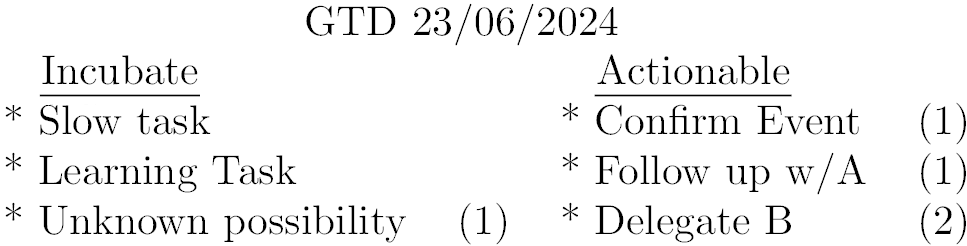
This compact version expects GTD knowleadge to execute as it bundles up information. It boils down the process to what I’ve determined to be the two most useful Diagram Blocks: Incubate, and Actionable. Capturing happens under these two columns over the day/week. A date helps locate which GTD is currently in focus, expecting one to last a week. A new GTD can be made if tasks changed quickly or the old one needs refactoring.
Anything under Incubate includes all the tasks that would be nice to complete, but there’s no time frame, and it’s okay to prolong/extend and even miss. It also includes all references. I don’t bother noting down trash, and anything crossed out I count as trash visually, so it doesn’t need to be moved/rewritten, even if it’s in the Actionable column.
Anything under Actionable is a task that needs Defering, Delegation or to be completed. Attempts at writing tasks down should try and maintain the same topic as much as possible. After all, when focusing on a project, it’s easy to think of all the tasks. It’s much harder to jump around various tasks and write them all down. This can fail as things come up, and as the section grows over the day, but it’s good enough.
Clarify and Organise happen in one step under these two columns. To assist organisation, space is left for tags/numbers next to the columns. I usually leave space underneath the page for these columns to expand on what the tags mean if necessary.
Numbers can be particularly useful to denote priority as well, working double-duty.
An example